

What is Custom Quote Template in HubSpot?
In HubSpot, a custom quote template refers to a personalized and branded document that is used to present quotes or proposals to clients or prospects. It allows you to create professional and customized quotes that are tailored to your business and reflect your brand identity.
With a custom quote template, you can include various elements such as your company's logo, colors, fonts, and imagery to create a consistent and visually appealing quote document. This helps in conveying a professional image and reinforcing brand recognition.
Additionally, custom quote templates in HubSpot offer flexibility in terms of content and design. You can customize the layout, add pricing details, product descriptions, terms and conditions, and any other relevant information that needs to be included in the quote. This allows you to present a comprehensive and accurate quote that aligns with your specific offerings and business requirements.
By utilizing custom quote templates in HubSpot, you can streamline your quoting process, maintain consistency in branding, and provide a professional and visually pleasing experience for your prospects and clients.
Which cases company should consider set up individual tax rate per product in their quote?
1. Different Tax Regulations: Tax rates vary across countries and regions. Each country has its own tax laws and regulations, including different tax rates for different products or services. Setting up tax rates per product enables businesses to accurately apply the appropriate tax rate based on the jurisdiction in which the product is being sold.
2. Compliance with Local Laws: To comply with local tax laws, businesses must calculate and collect the correct amount of tax for each product sold. By setting up tax rates per product, businesses can ensure they are meeting the tax requirements set by the local authorities, reducing the risk of non-compliance and potential fines or penalties.
3. Product-Specific Tax Exemptions: Some products may be exempt from certain taxes or qualify for reduced tax rates based on local regulations. By setting up tax rates per product, businesses can accurately apply exemptions or reduced rates when applicable. This ensures compliance with local tax laws while maximizing cost efficiencies for eligible products.
4. Accurate Pricing and Revenue Management: Setting up tax rates per product allows businesses to accurately calculate the final price, including taxes, during the sales process. This ensures that customers are charged the correct amount and helps businesses manage revenue and financial calculations more accurately.
5. Transparent and Trustworthy Pricing: Transparent pricing that includes clearly displayed taxes can help build customer trust and improve the purchasing experience. By setting up tax rates per product, businesses can display the inclusive taxes on their invoices or during the checkout process, providing clarity and transparency to customers.
It's important for global businesses to stay updated on tax laws and regulations in the jurisdictions they operate in. This enables them to set up and maintain accurate tax rates per product, ensuring compliance and providing a seamless customer experience.
How you can set up individual tax rate per product in HubSpot
1. Create Tax property for your product
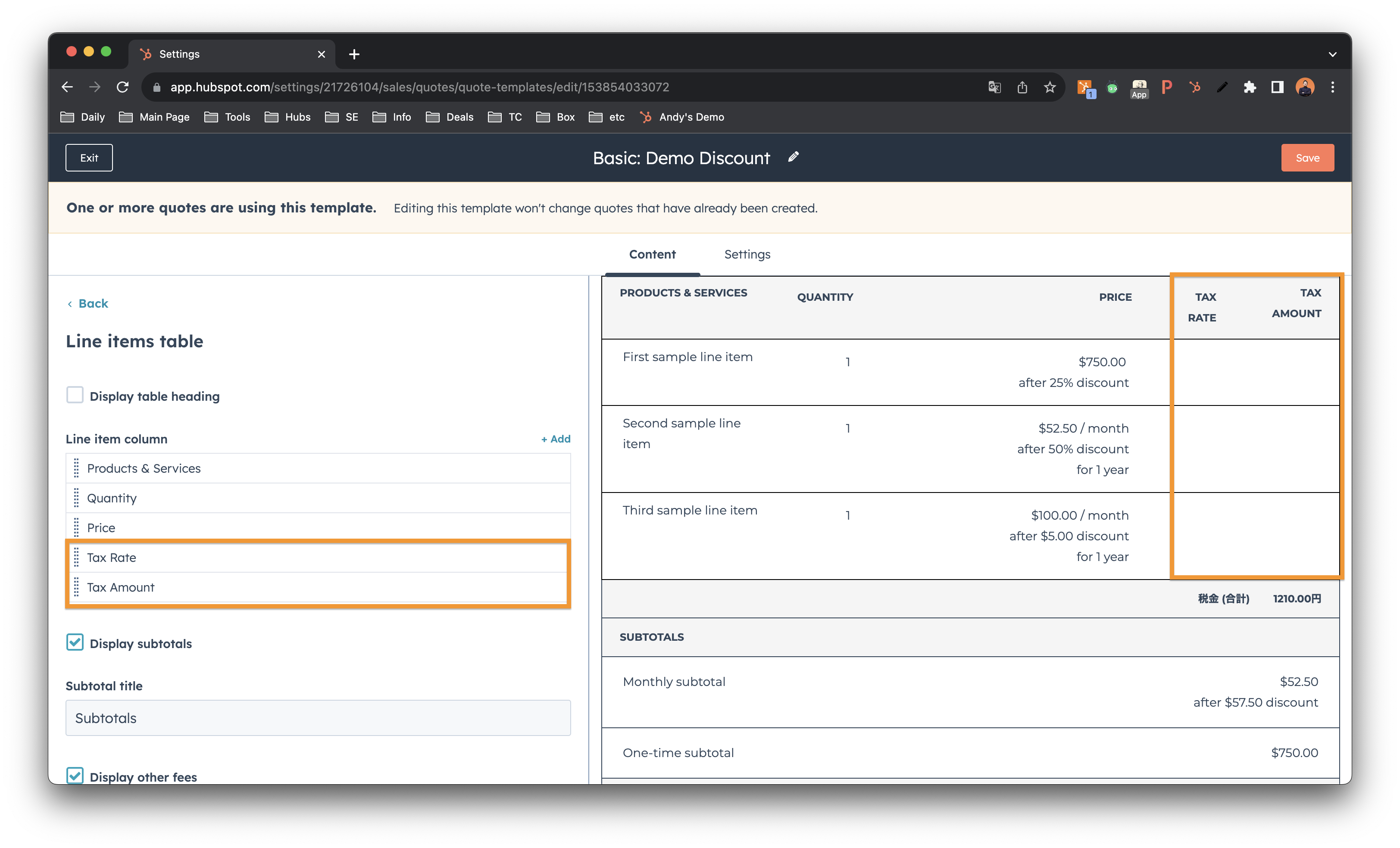
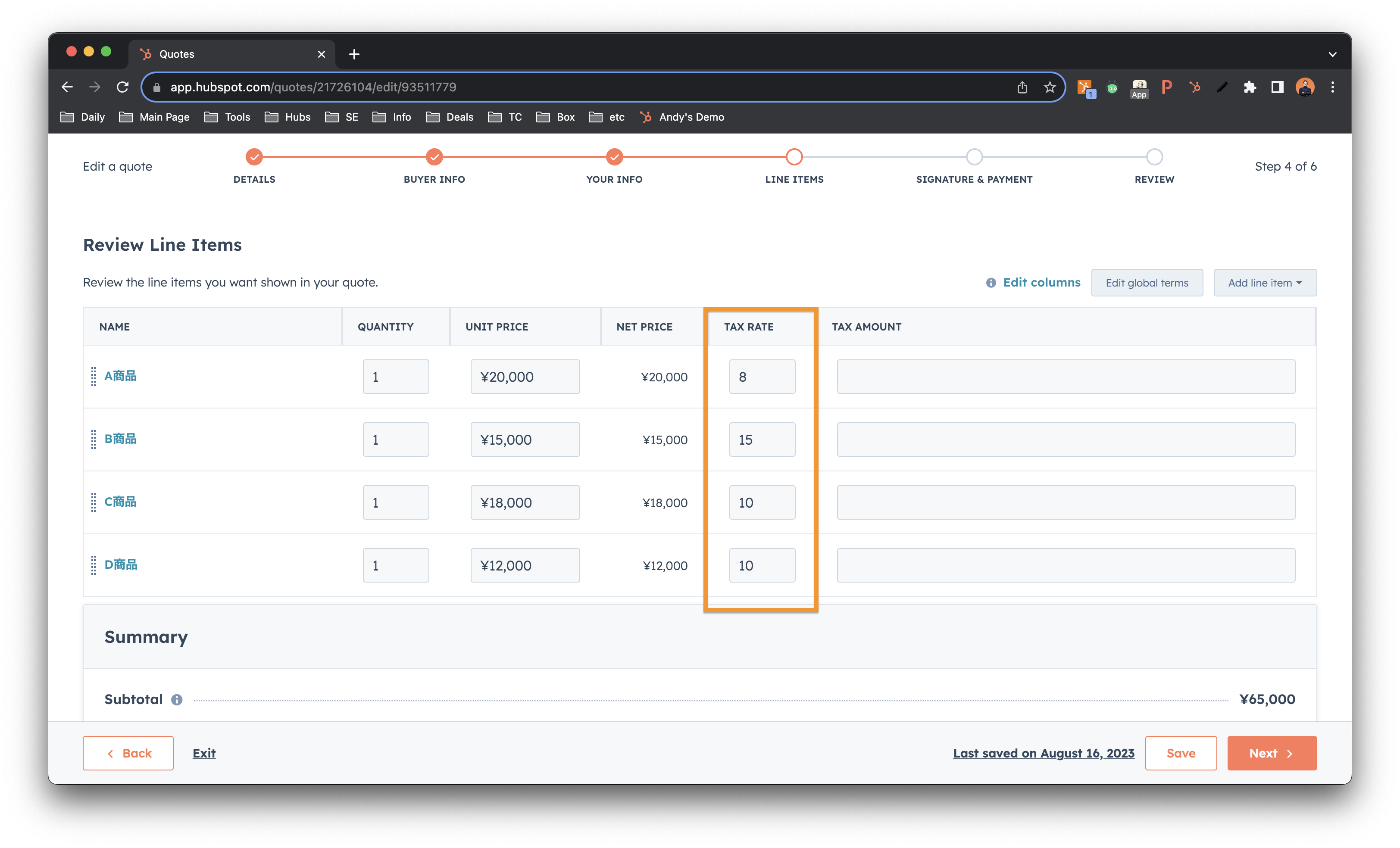
2. Add Tax Rate & Tax Amount column in Line item table
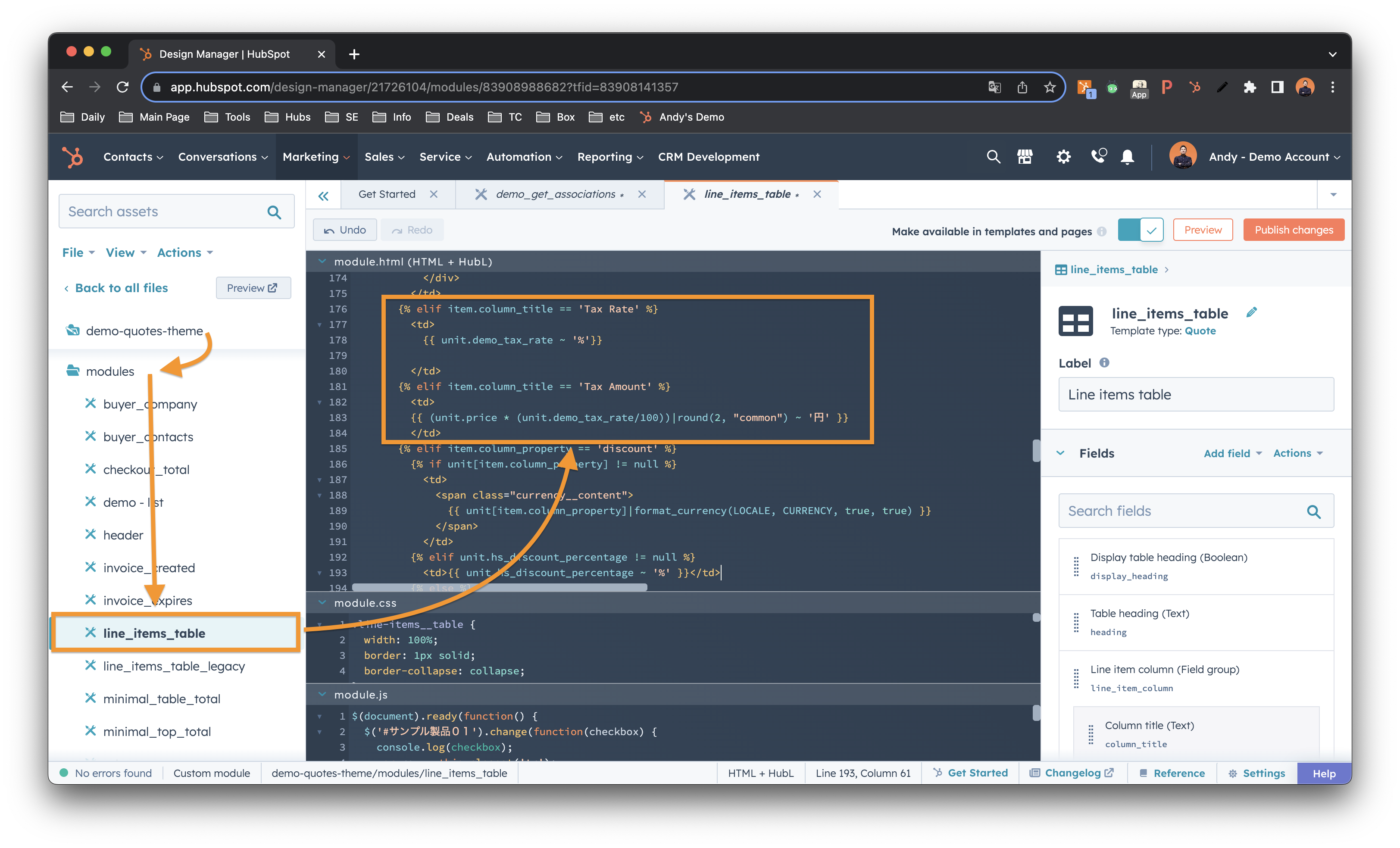
3. Modify Line item module in Custom Quote Template
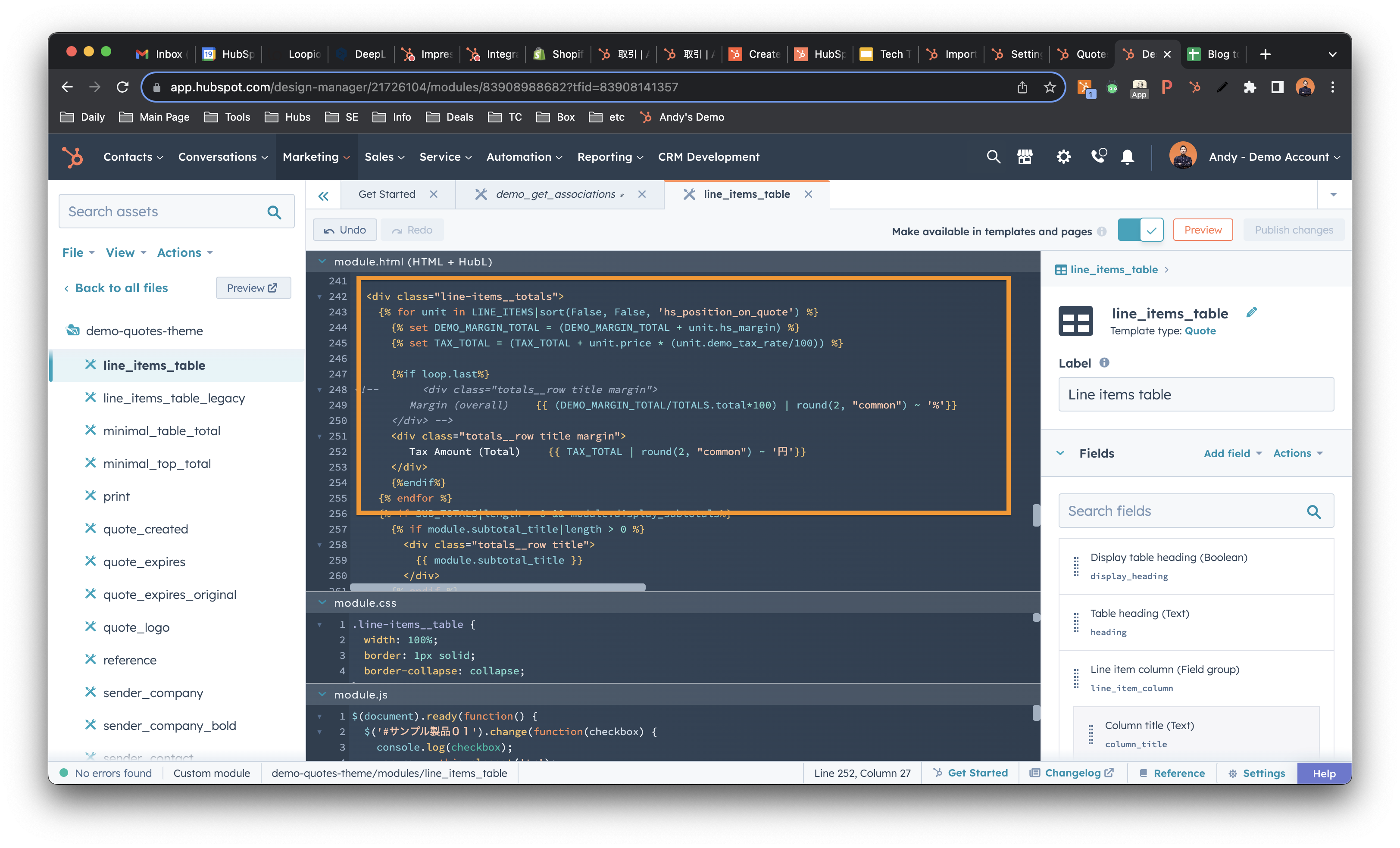
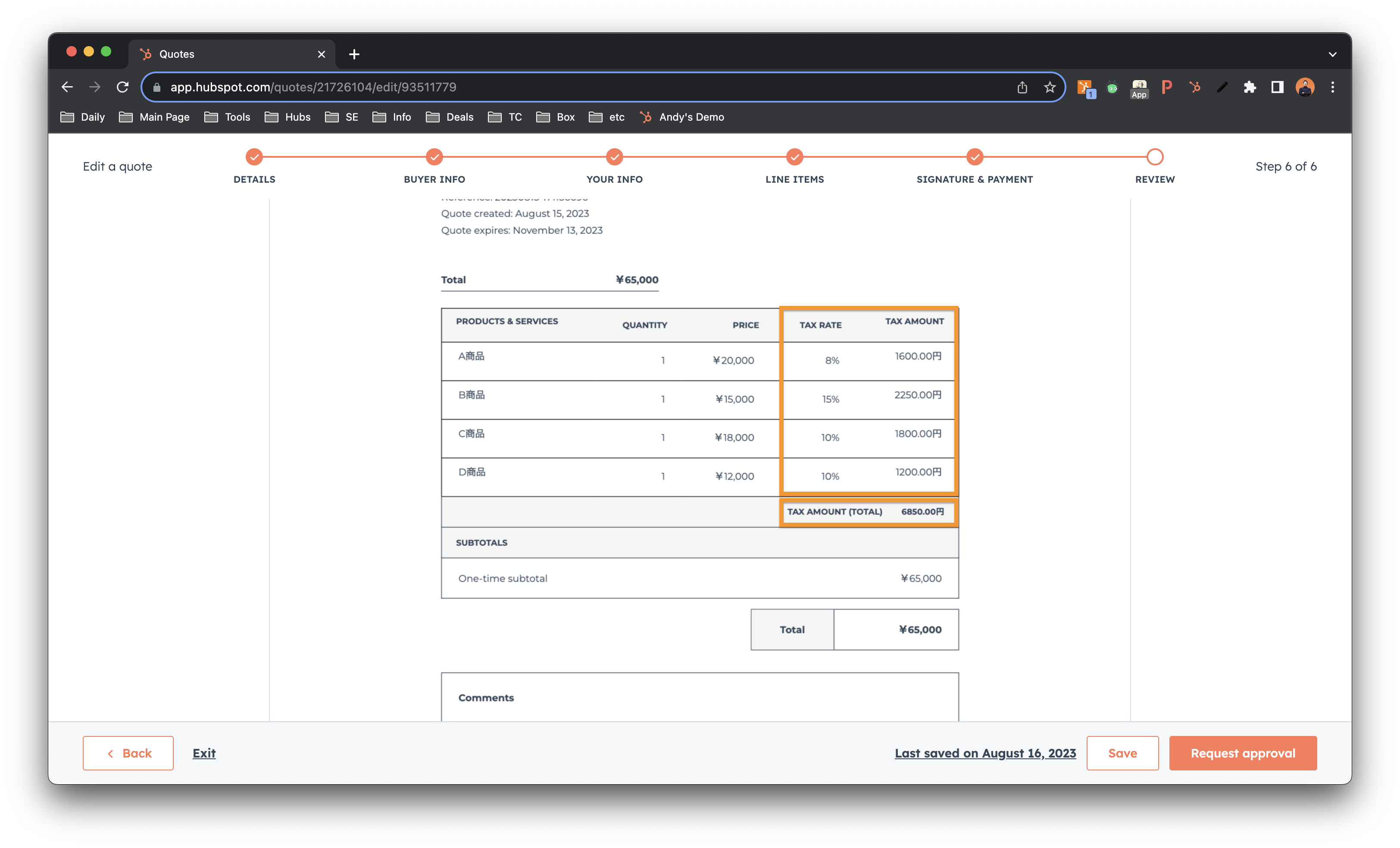
4. Calculate and display the total Tax Amount if needed
Output
Set up individual tax rate per product
Result
Conclusion
In conclusion, sometimes businesses may need to set up tax rates per product for several reasons. Different tax regulations across countries and regions require businesses to accurately apply the appropriate tax rates based on the jurisdiction in which the product is being sold. Compliance with local tax laws is essential to avoid penalties and maintain a good standing with authorities. Product-specific tax exemptions or reduced rates also need to be accurately applied to ensure compliance and maximize cost efficiencies. Accurate pricing and revenue management are crucial for businesses to calculate the final price, including taxes, during the sales process. Transparent pricing that includes clearly displayed taxes helps build customer trust and improves the purchasing experience. To navigate the complexities of global taxation, it is vital for businesses to stay updated on tax laws and regulations in the countries they operate in, enabling them to set up and maintain accurate tax rates per product.
Heads up
When setting up individual tax rates per product using a custom quote template in HubSpot, it's important to note that the calculated tax amount will not automatically apply to the deal amount. The tax amount calculated within the quote template will be specific to the product and displayed on the quote itself. The deal amount in HubSpot does not automatically include the tax amount calculated in the quote. It will be necessary to manually adjust the deal amount to include the tax amount if needed. Keep this in mind when working with individual tax rates per product to ensure accurate calculations and alignment between quotes and deals.